

How to barcode a product
1. Create unique identifiers using the GS1 Company Prefix
All GS1 identifiers and barcodes are generated using the GS1 Company Prefix. You can conveniently order the GS1 Company Prefix from our webshop.
Learn about GS1’s identification standards, which are used to create identifiers for products, locations, and parties, among other things. The page for each identification standard explains how the identifier is created using the GS1 Company Prefix.
If you need GTINs or GLNs, they are easy to create, maintain and manage in the GS1 Rekisteri.
Useful links
2. Select a barcode type
The requirements for the type of barcode depend on where and how the barcode is read. For example:
- If the barcode is read with a POS terminal (at a cash register in a store), it must be marked with an EAN-13 or EAN-8 barcode. In the future, the GS1 2D code will also work at POS terminals.
- If the barcode needs to contain additional information in addition to the GTIN, such as a batch number or a best before date, a GS1-128, GS1 DataBar, GS1 Datamatrix or EPC/RFID identifier or GS1 2D code should be used for labelling.
- If the barcode is usually scanned outdoors or in dirty conditions, GS1 Datamatrix or EPC/RFID tags are suitable as they are very durable. The GS1 Datamatrix is more wear resistant than other barcodes and can also be
printed directly onto metal. The EPC/RFID tag can be read from a greater distance than a barcode. - If the barcode is printed directly on corrugated cardboard, the ITF-14 barcode is the most suitable option. In this case, however, the product cannot be read at cash registers, i.e. the label is not suitable for consumer packaging.
Useful links
3. Specify the barcode size
The size of the barcode is affected by the selected barcode type, reading environment and printing method. Certain printing methods may have a limit to how small a barcode can be printed without quality degradation. The scanning environment also affects the code size.
Example
- For an EAN-13 barcode, the minimum size is 29.83 mm x 18.28 mm and the maximum size is 74.58 mm x 45.7 mm
- For an EAN-8 barcode, the minimum size is 21.38 mm x 14.58 mm and the maximum size is 53.46 mm x 36.46 mm
4. Add plain text
The content of the barcode must also be shown next to the barcode in plain text, known as Human Readable Interpretation (HRI), so that the information can be read without scanning if necessary.
- The font must be clear and easy to read.
- The plain text of the EAN-13 barcode and the GS1 2D code must be placed below the code, but in ITF-14 and GS1-128 barcodes it can also be placed above the code.
- If an application identifier is used, it is written in parentheses in the plain text. Parentheses should not be placed in the data content of the barcode.
Example
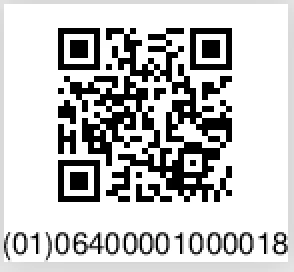
The GTIN is placed below the GS1 2D code in the following format:
- the application identifier for the GTIN code in parentheses, i.e. (01)
- the number zero
- the 13-digit number sequence of the product’s GTIN
5. Select the barcode color
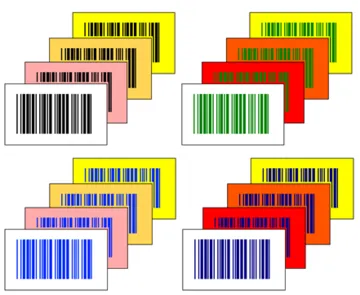
The contrast between the colors must be sufficient, and the dark and light elements of the code must stand out clearly from each other in all lighting conditions. The recommended and safest color combination is a black barcode
on a white background.
If you want to use other colors, it is important to make sure that the barcode can be read without problems. In any case, the barcode must be in a dark color and the background light.
Red and reddish shades, such as orange, pink or light yellow, are suitable as background colors, but not for the bars, because most barcode scanners use red reading light and may not recognise reddish bars.
For the GS1 2D code, it is good to note that in addition to the red reading light used by barcode scanners, the code must also work well with smartphone camera scanners, which use natural or white light. This sets additional restrictions on the color choices for the GS1 2D code and its background.
6. Specify the location of the barcode
The barcode should be positioned so that it is easily readable. Printing or gluing the barcode on corners, folds, creases, seams and other uneven surfaces should be avoided. There must always be blank space at the beginning and
end of the barcode.
The print direction of the barcode often affects the print quality of the barcode. This should be taken into account when planning the design of the product and the location of the barcode.
7. Print the barcode or have it printed on the packaging
If you need a large number of labels with the same barcode or want the barcode to be printed directly on the packaging, it is a good idea to contact an advertising agency or printing house.
If you only need a small number of labels with the same barcode or you want to mark pallets, in which case each label is different, you should take care of the printing yourself. Then it can be good to contact the suppliers of printers
and programs.
If the barcode contains variable information, such as batch or date information, it must be possible to print it when that information is created for the product, for example on the production or packaging line. In that case, it is advisable to contact your own equipment suppliers.
You can create, save and print barcodes in GS1 Rekisteri. However, make sure that the print quality is sufficient to scan the barcode.