
GS1 Data – Primary product image
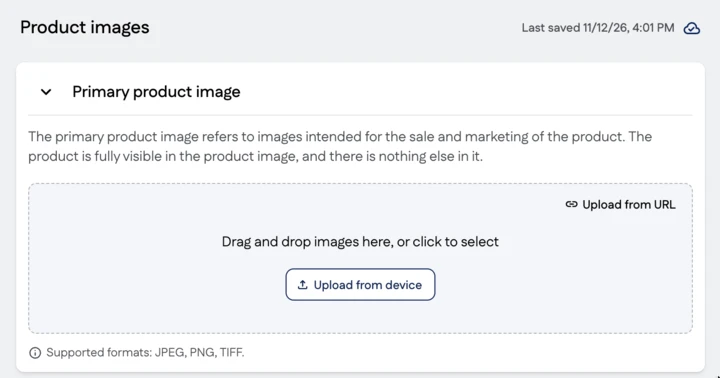
The primary product image refers to images intended for the sale and marketing of the product. The product image shows the product fully visible and nothing else. It is enough to add one good-quality product image to the product, which is:
- always cut out from its background on a transparent or white background
- tightly cropped, with small spaces at the sides of the product.
You can save several product images in GS1 Data. The product can be photographed from different directions and can be in packaging or out of packaging. Select the most representative of the primary product images as the main image (Primary image).
Adding a primary product image
Product images are maintained centrally in the Product images group. There are separate sections for different image types. Add images by dragging them or uploading them from your device to the Primary product image section.
Maintain the following information from the code lists for the product image:
Image type
Select either Product image or Product image with supporting elements.
We recommend adding high resolution (over 2400 px) product images due to their versatility.
Product image
In this image type, only the product is shown without any other items. The image is cut out from its background on a transparent or white background.
Product image with supporting elements
This image type shows the product, and in addition, the image may contain items that are not part of the actual product. The purpose of additional items is to emphasise the product in the picture, not to decorate it. For example, a steak is placed on a plate or a shirt is worn by a model. The image is cut out from its background on a white or transparent background. Product images with supporting elements are not the same as mood or purpose images.
Facing
The product can be photographed from several different directions. The direction from which the product is photographed depends on the type of packaging and the intended use. In GS1 Data, specify the side from which the product is photographed:
| Code | Value |
|---|---|
| 1 | Front |
| 2 | Left |
| 3 | Top |
| 7 | Back |
| 8 | Right |
| 9 | Bottom |
| 0 | Not applicable |

Orientation
We recommend that the product is photographed using a small plunge angle so that the shape of the product can be seen in the picture. In addition, the product can be photographed a little from the side. In GS1 Data, specify whether the angle is:
| Code | Value |
|---|---|
| C | Centre |
| L | Left |
| R | Right |
No plunge angle is suitable for products that do not have three dimensions, such as spice bags.
| Code | Value |
|---|---|
| N | No plunge angle |

State
State refers to how the product is presented in the picture.
| Code | Value | Description |
|---|---|---|
| 1 | In packaging | The product is photographed in its packaging. |
| 0 | Out of packaging | The product is taken directly from the package, after which it has not been processed or prepared. |
| A | Case | A picture of the product in the transport package as it looks when transported. |
| B | Inner pack | A picture of the product in the inner packaging of the transport package. |
| C | Raw uncooked | An image of a product that has not been prepared or processed, or that requires preparation or processing before it can be eaten. |
| D | Prepared | An image of a product that has been prepared (e.g. baked, fried, grilled or cooked) from a raw or non-prepared product. |
| M | Open case | A picture of the opened transport package, showing how the products look in the package when it is opened. |
| P | Pallet/display | A picture of the product on a pallet. |
If the image type is Product image with supporting elements, you can also use the following options:
| Code | Value | Description |
|---|---|---|
| E | Plated | Prepared food that is simply laid out on a plate or in a bowl to make it more visible. The image may also include garnish, frosting, spices or other enhancements. |
| F | Styled | A carefully and artistically laid out product that offers an attractive visual image conveying the taste, aroma and appeal of the product. The picture may also contain other products (a starter and side dishes), showing the whole meal. The image may also include garnish, frosting, spices or other enhancements. The image can be presented with different backgrounds and from different angles. |
| G | Staged | An image of the product positioned so that it is clearly visible. The product may be raised for display, but it must not be held in a person’s hand or used in any way. |
| H | Held | An image of the product being held with one or two hands. The correct grip can be demonstrated if necessary. The photo should not show any part of the person other than their hands and arms. |
| J | Worn | An image of a product, such as a protective product or garment, worn by a model. The entire product must be visible in the picture, but the person wearing the product should be cropped out of the picture as much as possible. |
| K | Used | A picture of the product being used in an environment suitable for it. Small equipment and tools can be shown held in one or both hands. |
| L | Family | An image of several related products (e.g. compatible sets, tableware). |
| Q | Formed | An image of a product with its supporting form (for example, a model, mannequin or hanger) removed to give the product a three-dimensional appearance. |
Primary image
The first primary product image added is automatically marked as the Primary image. You can change the main image, but the product must have one main image. The most representative image of the product is selected as the main image. If the product is sold packaged, the main image must show the product in its packaging. The main image of a bulk product, such as cauliflower, can show the product out of packaging.
Users of product information use the Primary image information to retrieve product images for their own systems, for example an online store.
Material requirements for the primary product image
Product images are used in a variety of ways for product sales and marketing, so the product shown in the primary product image must have a representative appearance and the product image must meet the material requirements.
| File format | PNG, JPEG or TIFF (LZW compressed) |
| Image size | Longer side 900–4800 px (Recommendation 2401–4800 px) |
| Colour space | RGB |
| Background removal | The image is cut out from its background with a transparent background or a clipping path and a white background. |
| Cropping | The image area is cropped as close as possible to the product. |
Also note the following instructions:
- The best before date for the product does not appear in the image.
- The product shown in the picture has a representative appearance: the product is not crushed, dirty or dusty, and its packaging is not damaged by abrasion.
- The surface of the product does not show unnecessary gloss.
- The product is in sharp focus in the picture, i.e. a large depth of field has been used.
- The product has been photographed in adequate lighting.
- The picture has realistic and neutral shadows and reflections.
- The colours in the image are rich and balanced and match the colours of the product.
- The image is free from camera shake.
- The image has not been over-sharpened.
- The image has not been enlarged to greater pixel dimensions (interpolated).
- There is no moiré pattern on the product label.
- No signatures or watermarks are shown in the image.
- The image file does not contain layers or alpha channels.
Optional additional information for the primary product image
In addition to basic information, you can save the following optional information for product images:
| File Sequence Number | Separates two images with the same name. An integer from 0 to 99. |
| Alternate Text | Alternate text (alt-text) describes the image, improving the accessibility of online content. |
| Language Code | Indicates which language appears in the product image. Used if several images of the product are published showing different languages. |

Example: 06400001069015_C1C1.jpg
In addition to the above, there can be additional information in the file name, separated by underscores.
| Language Code | The primary language that appears in the product image. In two-letter ISO 639-1 format, for example fi, sv, en. |
| End date | Enter four digits: mmyy. For example, December 2024 is entered as 1224. |
| Sequence number | Enter a two-digit number preceded by the letter s. For example, s02. |
Example: 06400001069015_C1C1_fi_1224_s02.jpg