
GS1 Data – Product visibility
In GS1 Data, products are created as public. Exceptions are exclusive and private label products, for which visibility is limited to specific recipients.
Product visibility to product data recipients
In GS1 Data, a product can be public or limited. Product visibility is set to public by default.
1) Public product: Any product data recipient can subscribe to and view the product data
2) Limited product: Only product data recipients selected by the user can receive the product data
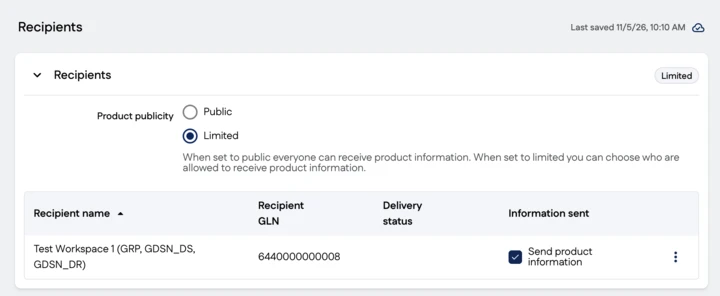
The Recipients table shows the recipients who have created a product data subscription matching your product.
Product visibility is inherited within the packaging hierarchy
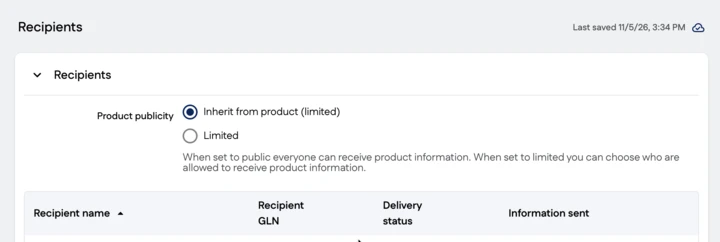
Product visibility is selected for the product and inherited by cases and pallets. Inheritance can be broken if, for example, a public packaging hierarchy includes a pallet of a different size with limited visibility.
To break inheritance, change the value for the relevant packaging level from Inherit from contained item (public) to Limited and select a recipient from the list.
Limited product
Limit visibility to specific recipients by selecting Limited for the product in the Recipients group.
When you select Limited as the product visibility, the Information sent column appears in the recipients table. In the table, select the trading partners who are allowed to see the product data.
If the recipient to whom you want to limit visibility is not shown in the Recipients group, you need to ask them to create a product data subscription.
Limited status in the packaging hierarchy and product list
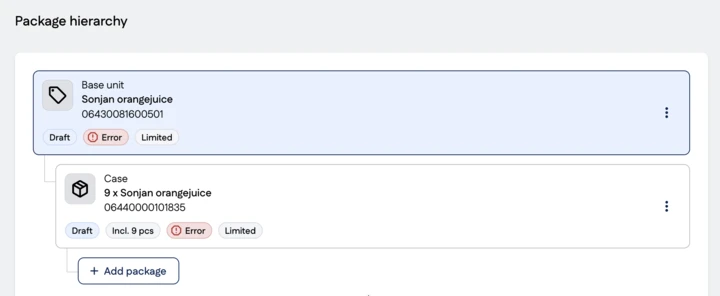
You can identify a limited product in the packaging hierarchy by the Limited icon. In the product list, information on limited visibility is shown in a separate column called Product publicity.
Change the visibility of a published product
You can change product visibility in the Recipients group. The change is made to the retail product and inherited by transport packages and pallets. This creates an unpublished change that must be published.
You can change a limited product to public by selecting Public, and a public product to limited by selecting Limited.
Discontinue data transmission to a selected recipient
Clear the checkbox for each recipient to whom you do not want to transmit product data. When you discontinue data transmission to a recipient, their confirmation status changes to Transmission ending. After publication, the confirmation status is Not transmitted.